
Let’s be honest: most teams install CAD updates the same way they microwave leftovers—fast, familiar, and with zero intention of changing anything. New tools? Maybe later. Updated workflows? Too busy.
But here’s the twist—SolidWorks 2025 isn’t waiting for old habits to catch up.
It quietly solves problems your team’s still wrestling with—annotation chaos, version mix-ups, and endless revision cycles. Ignore it, and those small inefficiencies start compounding fast.
So what’s actually worth adopting—and how do you make the right call without overwhelming your workflow?
Identify Where Teams Fall Behind After an Update
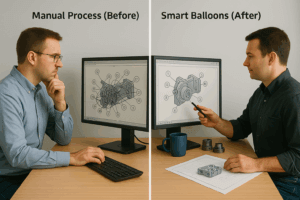
A common mistake is assuming post-update workflows can stay the same. While the Solidworks CAD Software changes, templates, habits, and drawing practices often don’t.
That disconnect leads to issues such as:
- Continued use of manual balloons, even when automated grouping (smart balloons) is available
- Static revision tables that fail across configurations
- Misaligned documentation despite improved modeling accuracy
- Underutilization of cloud-based collaboration tools
The result? Design intent is clear in the CAD model—but unclear in the deliverables. Teams lose time in downstream clarifications, drawing rework, and version-control disputes.
Skipping alignment after an update creates avoidable risk across engineering and production.

How to Evaluate Which Features to Adopt
Not every update should be adopted immediately. A practical evaluation approach helps you decide what adds value and what can wait. Use the following framework:
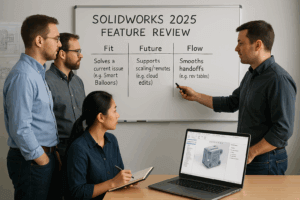 Fit – Future – Flow
- Fit
Does the feature solve a known issue?
→ Smart Balloons reduce clutter in complex assemblies. - Future
Will it support future team scale or structure?
→ Cloud collaboration becomes essential in hybrid environments. - Flow
Does it improve downstream handoffs?
→ Improved revision control reduces confusion in procurement and QA.
This method helps you focus on tools that directly impact your design-to-release pipeline. No distractions—just functional value.
The Missed Link: Documentation Still Lags Behind
Teams often improve how they model — but skip updating how they document. That’s where issues appear:
- Legacy title blocks don’t support new configuration methods
- Smart tools are ignored in favor of familiar routines
- Collaboration permissions are misaligned, causing version forks
The CAD model might be right — but if the drawing is misread, it fails. Updating documentation standards is just as critical as using the latest tools.
Design improvements without documentation alignment deliver half the value.
Top 2025 Features That Justify Immediate Adoption
 Several features in SolidWorks software in 2025 directly address the documentation and communication gaps highlighted above. Prioritize tools that eliminate clutter, reduce rework, and improve cross-functional clarity:
- Smart Balloons – Reduces drawing time and boosts readability
- Sketch Intelligence – Improves speed and reduces constraint errors
- Cloud Collaboration – Supports multi-user edits and structured versioning
- Enhanced Revision Tables – Tracks changes accurately across configurations
These tools target real pain points in clarity, speed, and consistency—without requiring major process overhauls.
SolidWorks 2025 introduces features that matter—but only if your team takes the time to evaluate and align. Prioritize updates based on operational impact. Review your drawing practices. And apply only what fits your current needs and future growth.
Treat your CAD upgrade as a workflow opportunity—not just a software patch.