
Choosing between a SOLIDWORKS subscription and a perpetual license is one of the most important purchasing decisions an engineering team makes, and price alone isn’t the right place to start. The real question isn’t “which is cheaper today?” but “which is cheaper across the actual life of how we work?”
Quick answer: A term (subscription) license is more cost-effective when your need is short-term, project-based, or variable, because it keeps the upfront investment low. A perpetual license becomes more cost-effective once you pass the break-even point, usually a few years of continuous, year-round use, because ownership plus subscription delivers the lowest total cost over time.
The rest of this guide shows you how to find your break-even point, which hidden costs to plan for, and how to match the licensing model to your team instead of guessing.
Subscription vs. Perpetual: At a Glance
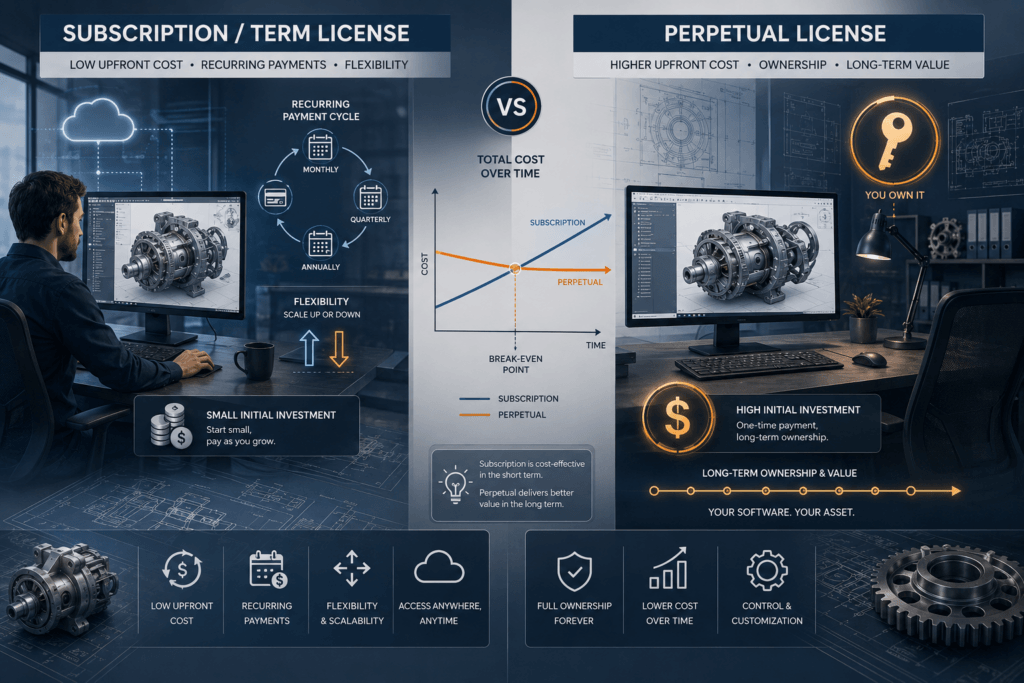
Here’s the trade-off in one view before the deep dive.
| Factor | Term (Subscription) License | Perpetual License |
|---|---|---|
| Upfront investment | Low | High |
| Ongoing cost | Recurring, for as long as you use it | Optional annual subscription service |
| Ownership | Access for the term only | Yours indefinitely |
| Latest version & support | Always included | Only while subscription is active |
| Budget type | Operating expense (OpEx) | Capital expense (CapEx) |
| Flexibility to scale up/down | High | Low |
| Best long-term value | No | Yes, past the break-even point |
| Ideal for | Freelancers, startups, seasonal or contract work | Steady, year-round, long-term use |
The verdict: Neither model is cheaper across the board. The winner comes down to how long and how consistently you’ll use SOLIDWORKS, which is exactly what the break-even analysis below shows.
Understanding the Two Licensing Models
Both models give you the same, full version of SOLIDWORKS. The difference is entirely in how you pay for access and what happens over time.
What a Perpetual License Really Means
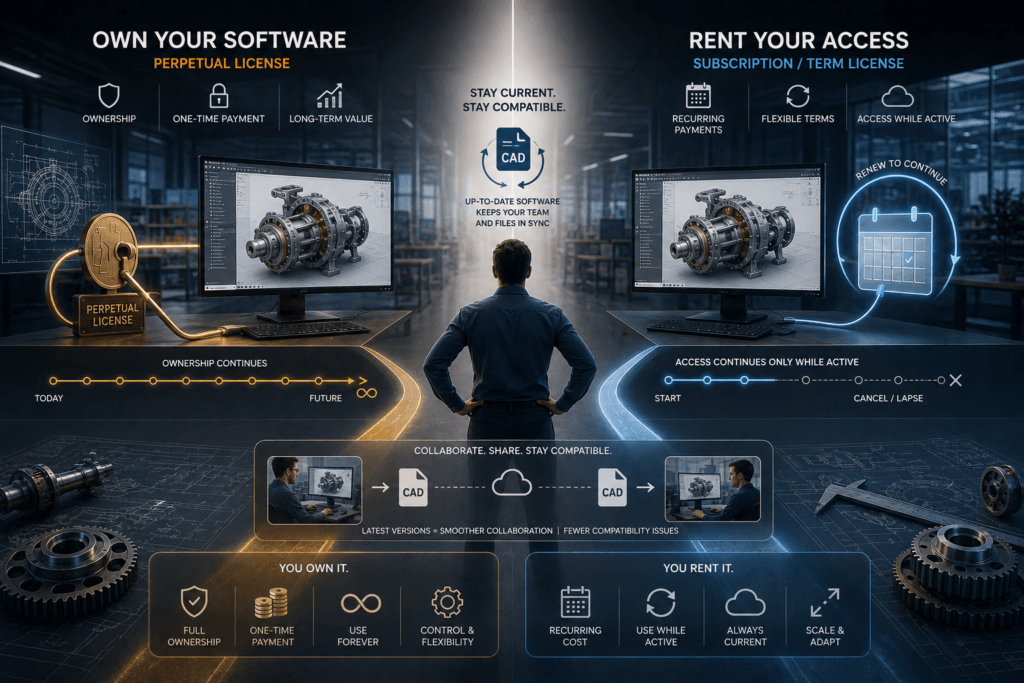
A perpetual license is a one-time purchase that never expires. Once you own that version of SOLIDWORKS, you can keep using it for years to come, even long after purchase, with no further payment required to keep it running.
There’s a nuance engineers often miss: owning the license and staying current are two different things. To get new releases, technical support, and access to companion tools, a perpetual license needs an active subscription service (sometimes called maintenance). Let it lapse and the software keeps working, but you’re frozen on the version you own.
That freeze matters more in CAD than in most software. SOLIDWORKS files aren’t backward-compatible, a part or assembly saved in a newer release generally can’t be opened in an older one. If a client, supplier, or colleague moves to the current version and you haven’t, you can end up unable to open files they send you.
What a Term (Subscription) License Really Means
A term license works more like a rental. You pay for the right to use SOLIDWORKS for a set period, typically three months (quarterly) or a year, with support and upgrades built into that cost.
The mechanics are almost identical to a perpetual license: same full-capability software, same file formats, same installation. The only real difference is that activation carries an expiration date (with a grace period built in for setup). Stop renewing, and access ends.
Term licensing exists to lower the barrier to entry and add flexibility, you can add licenses when a project ramps up and let them lapse when it slows down.
The Four SOLIDWORKS License Types
Subscription vs. perpetual is only half the decision. Each model comes in a standalone and a network flavor, giving you four combinations.
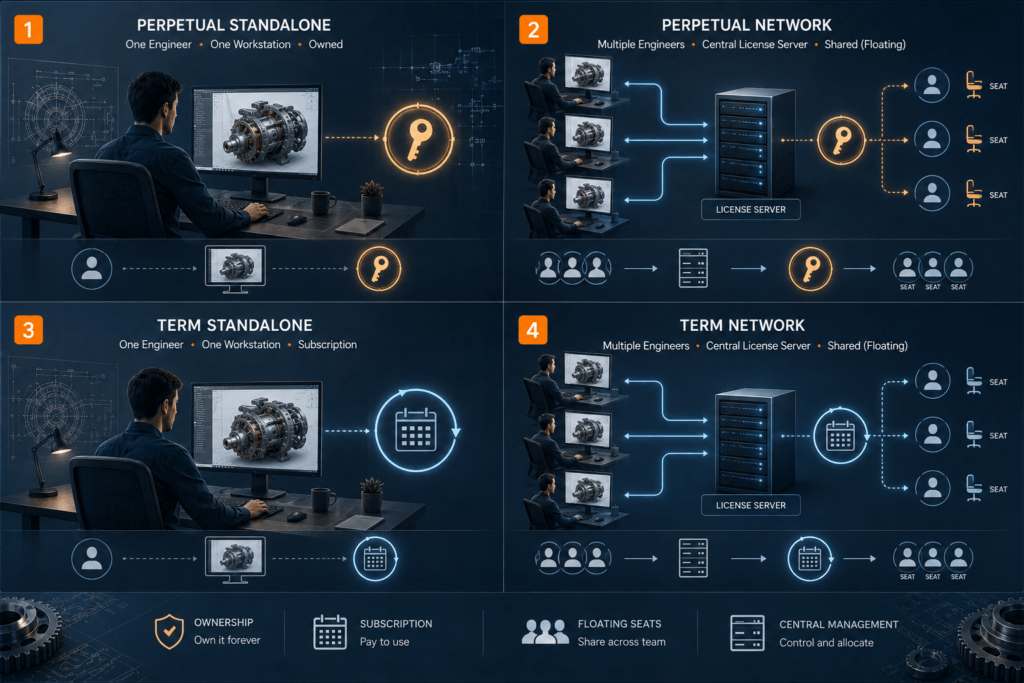
| License Type | Payment Model | Access | Requires License Manager? | Best For |
|---|---|---|---|---|
| Perpetual Standalone | One-time + optional subscription | Single machine | No | Individuals with a dedicated workstation |
| Perpetual Network (SNL) | One-time + optional subscription | Shared/floating | Yes | Teams sharing seats across users |
| Term Standalone | Recurring | Single machine | No | Freelancers, short-term or scaling needs |
| Term Network | Recurring | Shared/floating | Yes | Teams needing flexible shared access that changes often |
Perpetual Standalone
The classic model: purchased outright and locked to one machine. It uses an activate/deactivate system, so you can move the entitlement to a new computer when you upgrade hardware. Ideal for one person at a fixed desk.
Perpetual Network (SolidNetWork License / SNL)
Also called a floating license. The seat lives on a license server you host, and is checked out by a user when they launch SOLIDWORKS and returned when they close it. Fewer seats can serve more people, as long as not everyone needs the software at the same time. It requires a one-time SolidNetWork License Manager to distribute seats.
Term Standalone
The same single-machine setup as perpetual standalone, but renewed quarterly or yearly instead of owned. This is the lowest-commitment way into SOLIDWORKS.
Term Network
A floating license on a subscription basis, the flexibility of shared seats without a long-term capital commitment. It still needs a Network License Manager, but the seats themselves renew instead of being purchased outright.
Pro tip: You don’t have to pick just one. Many teams run perpetual seats for their core, always-on engineers and add term seats to cover temporary spikes in output, a hybrid that keeps baseline costs predictable while staying flexible.
Which Is More Cost-Effective? Think in Break-Even, Not Sticker Price
This is where most buying decisions go wrong. Comparing the day-one price of a term license against a perpetual license makes the term look dramatically cheaper, but that’s a snapshot, not the full picture.
The upfront-vs-ongoing trade-off
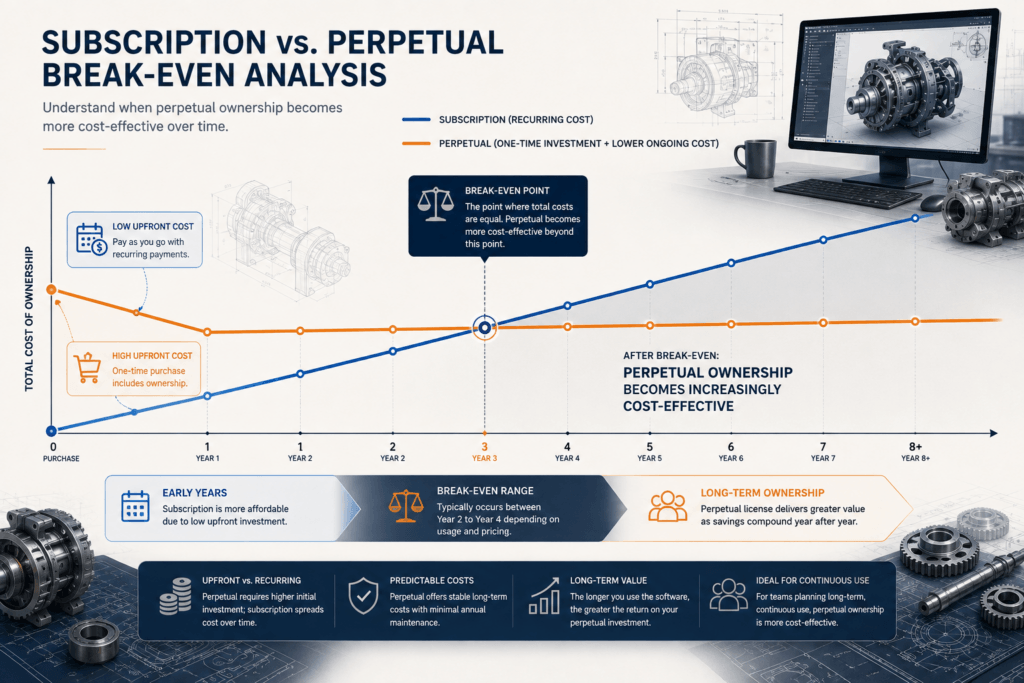
A term license front-loads almost nothing and spreads the cost evenly over time. Every renewal is another payment, indefinitely.
A perpetual license front-loads a large one-time investment, after which ongoing cost drops to just the optional subscription service.
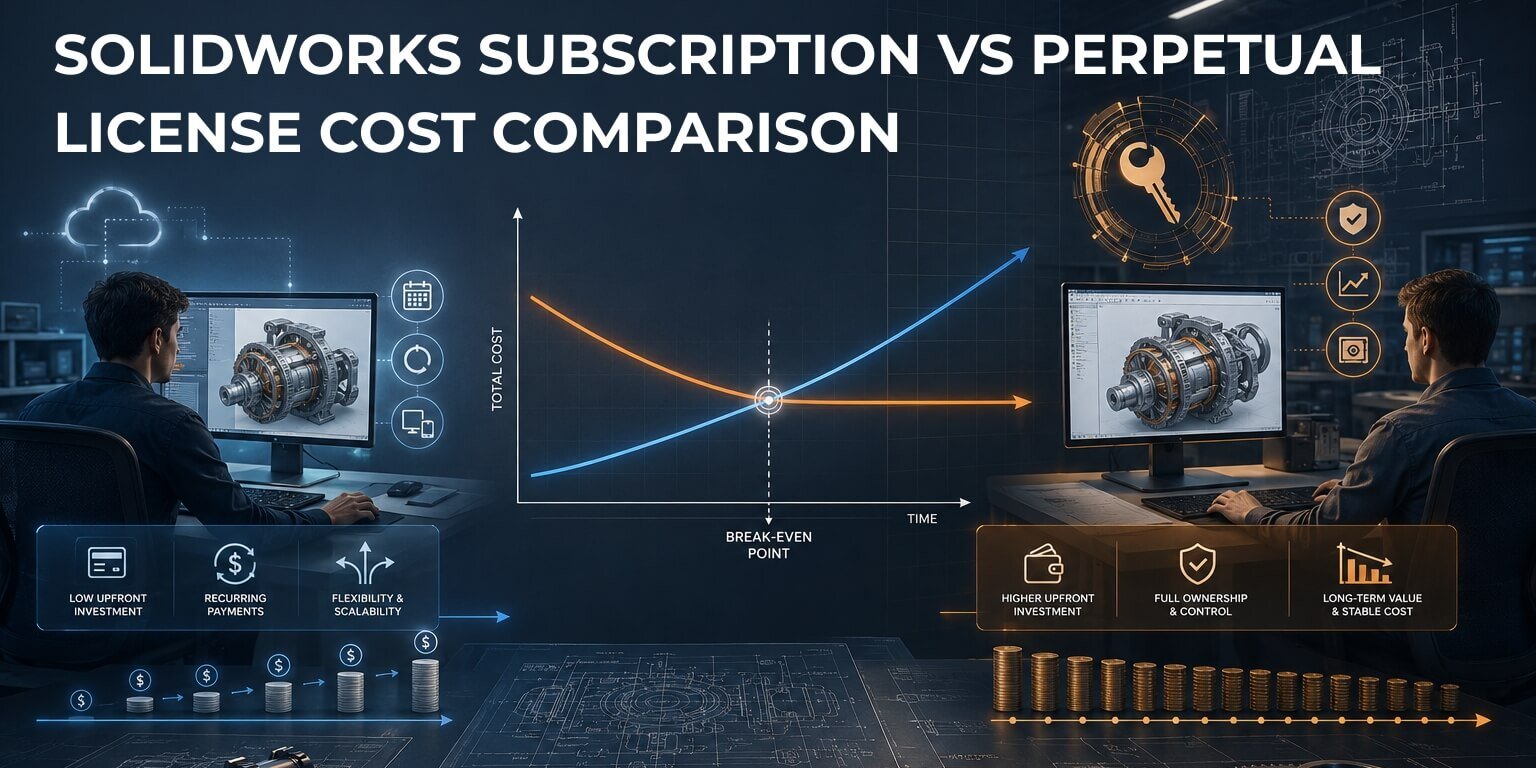
Plotted over time, the two form an X: the term line starts low and climbs at a steady slope, while the perpetual line starts high and then flattens out. The point where they cross is your break-even.
Where the break-even point falls
For continuous, year-round use, the crossover generally lands somewhere in the second to fourth year, after which perpetual pulls ahead and keeps widening its lead for as long as you own the seat.
The exact year isn’t fixed. It moves based on:
- The tier you buy (Standard, Professional, or Premium), higher tiers shift the crossover
- Whether you keep subscription service active on the perpetual license, this narrows the gap
- Add-ons such as Simulation, CAM, or PDM factored into the equation
- How consistently the seat is used, a seat that sits idle half the year rarely justifies ownership
The practical rule of thumb: if you’ll use a seat steadily for more than about three years, perpetual almost always wins on total cost. If your horizon is shorter or your needs fluctuate, term wins.
The mandatory subscription that shifts the math
Here’s something most comparison articles miss: new perpetual licenses now come with a minimum subscription commitment attached. That pushes real perpetual ownership costs up in the early years and moves the break-even point later than a simple “one-time price vs. rental” comparison suggests. Any honest cost analysis has to include it, a perpetual license is a one-time base cost plus that committed subscription, not a base cost alone.
Total Cost of Ownership: The Costs Engineers Forget
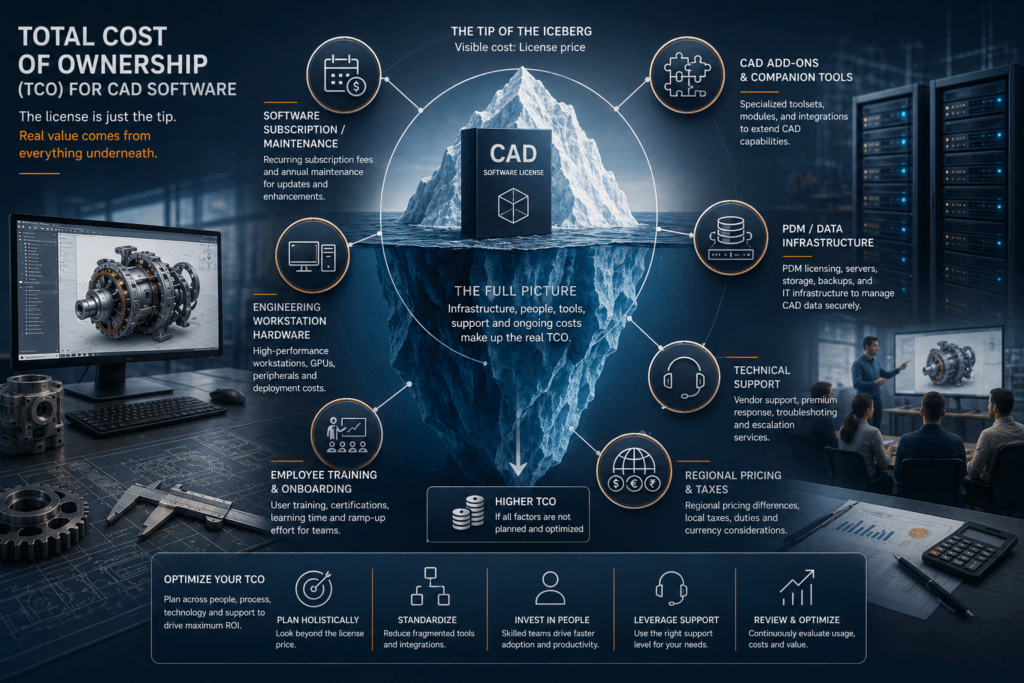
The license fee is just the tip of the iceberg. A fair cost comparison accounts for total cost of ownership (TCO), everything it takes to keep engineers productive.
| TCO Factor | Applies To | Why It Matters |
|---|---|---|
| Subscription service / maintenance | Perpetual (to stay current) | Without it, no upgrades, support, or new-version file compatibility |
| Add-ons & companion tools | Both | Simulation, CAM, PDM, Electrical each carry their own cost and renewal |
| Data management infrastructure | Both (if using PDM) | PDM Professional needs a server and database backend |
| Training & onboarding | Both | Skilled users get far more value from the same seat |
| Hardware | Both | SOLIDWORKS is demanding; certified workstations affect real cost |
| Regional pricing | Both | Costs vary by region due to tax, currency, and local support |
Subscription service on perpetual licenses
Ownership isn’t the end of spending. To keep a perpetual seat current, and able to open files from collaborators on newer releases, you maintain subscription service. Skip it and you save short-term, but risk version lock-in and file-compatibility headaches down the road.
Add-ons, upgrades, and companion tools
Professional and Premium tiers bundle capable companion tools, for example, PDM Standard, CAM Standard, and Visualize Standard, which is often better value than buying them separately. But production needs can outgrow what’s bundled. A common example: the CAM included with Professional and Premium handles lighter machining well, but shops doing multi-axis production often add a dedicated CAM package on top. Map your real workflow before assuming the bundle covers it.
Infrastructure, training, and hardware
Network licensing (whether perpetual SNL or term network) means running a license server. PDM Professional adds a database layer. And every seat performs only as well as the workstation under it and the engineer driving it. These aren’t licensing line items, but they’re part of what SOLIDWORKS actually costs your organization.
CapEx vs. OpEx: The Budgeting Angle That Decides It
Sometimes the most cost-effective option on paper loses out to the one that fits how your finance team budgets.
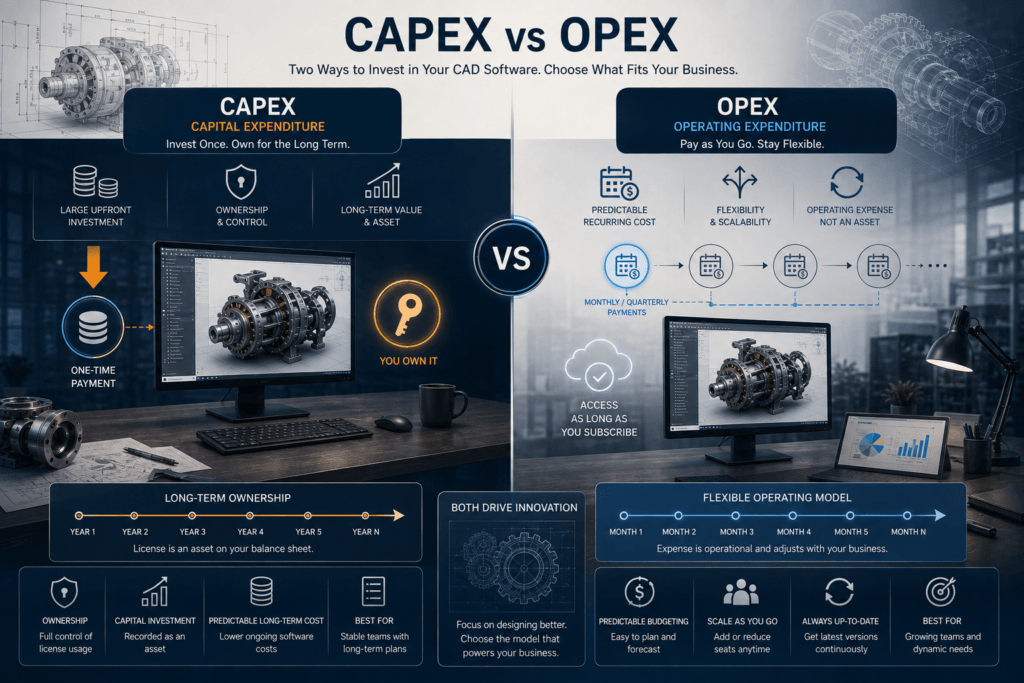
Perpetual licensing is a capital expenditure (CapEx). It’s a large one-time outlay for a lasting asset, typically funded from a capital budget. Teams that plan long-term and want to own their tooling gravitate here.
Term licensing is an operating expenditure (OpEx). It’s a predictable recurring cost funded from operating budgets, with no large asset to depreciate. Startups, venture-funded companies, and teams that value budget flexibility often prefer this.
For many organizations, this distinction, not the raw math, is the deciding factor. A perpetual license may win on five-year cost yet still be the wrong call if capital budget is locked and only operating spend is available. Loop in finance early.
Which SOLIDWORKS License Is Right for You?
Match the model to your situation rather than to a generic “cheapest option.”
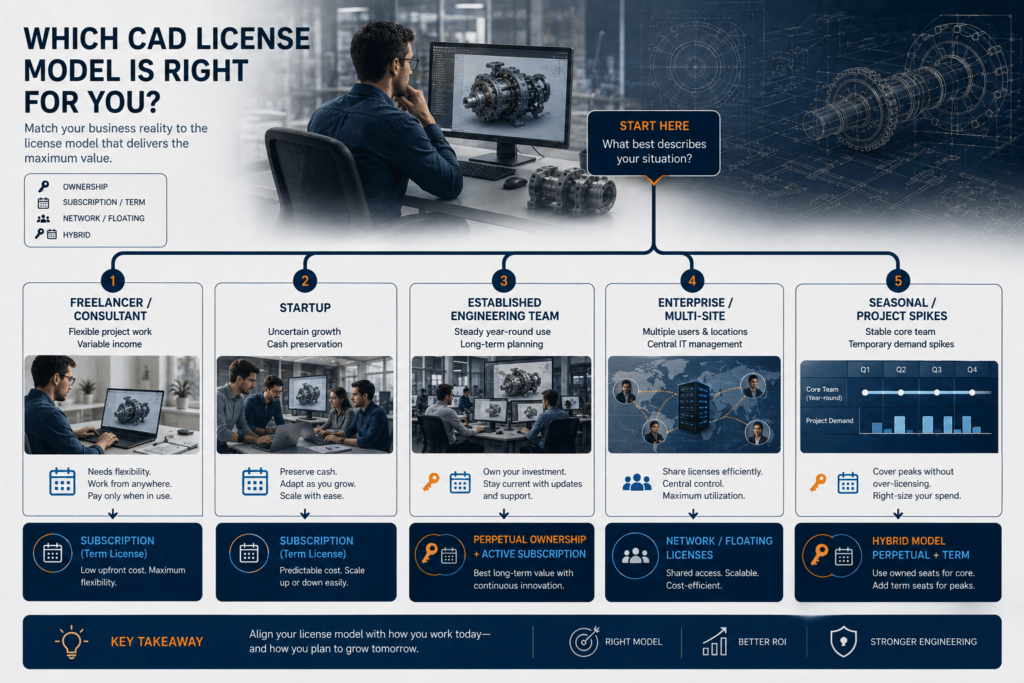
| Your Situation | Recommended Model | Why |
|---|---|---|
| Freelancer / hobbyist | Term Standalone | Lowest commitment; pay only while you’re working |
| Startup (< 3 years, direction still forming) | Term (Standalone or Network) | Preserves cash, adapts to uncertainty, OpEx-friendly |
| Established team, steady year-round use | Perpetual + subscription | Lowest total cost of ownership past break-even |
| Enterprise / multi-site | Perpetual Network (SNL) or hybrid | Shared seats, central management, predictable ownership |
| Seasonal or project spikes | Hybrid (perpetual core + term overflow) | Stable baseline plus on-demand flexibility |
Freelancers and consultants
Your workload is variable and your runway matters. Term standalone lets you switch SOLIDWORKS on for a contract and off between them, keeping fixed costs near zero.
Startups
When the product, headcount, or funding picture is still moving, flexibility beats ownership. Term licensing keeps commitment low and spend predictable, and you can switch to perpetual once usage stabilizes.
Established engineering teams
If SOLIDWORKS is core to your daily operation and will be for years, perpetual with active subscription delivers the lowest long-term cost and the peace of mind that your IP stays accessible on software you own.
Enterprises and multi-site teams
Floating network licenses maximize seat utilization across users and locations, while ownership keeps long-run costs predictable. Many large organizations run a hybrid: a perpetual base with term seats for surge capacity.
Does SOLIDWORKS Still Sell Perpetual Licenses?
Yes. This is a genuine differentiator worth knowing. Several major CAD vendors, including Autodesk and PTC, have moved to subscription-only models, phasing out perpetual licensing in key regions. SOLIDWORKS has continued to offer both perpetual and term licensing, on the view that different customers have genuinely different needs and there’s no one-size-fits-all answer.
For teams that specifically want to own their design tools rather than rent them indefinitely, that choice still exists, which itself can factor into a long-term cost strategy.
Frequently Asked Questions
Not initially, it carries a much higher upfront investment. But over continuous, long-term use it typically becomes cheaper once you pass the break-even point, generally after a few years. For short-term or variable needs, subscription stays cheaper.
You don’t have to, and the software will keep running without it. But to get upgrades, technical support, and the ability to open files from newer SOLIDWORKS versions, you need active subscription service. Many owners consider it essential rather than optional.
With a term license, access ends when the term expires. With a perpetual license, the software keeps working indefinitely, but you stop receiving upgrades, support, and companion-tool access, and you’re frozen on your current version.
Term licenses are typically available in three-month (quarterly) and one-year increments, with three months as the usual minimum
Yes. Perpetual and term seats are fully compatible and share the same file formats, so a common strategy is to own perpetual seats for core engineers and add term seats to cover temporary demand.
An SNL is a floating (network) license. Instead of being locked to one machine, the seat is stored on a license server and checked out by users on demand, allowing a pool of seats to serve more people than there are licenses.
The Bottom Line
There’s no universal winner in SOLIDWORKS subscription vs. perpetual licensing, only the model that best fits your usage horizon, your cash-flow reality, and your budgeting structure.
- Choose term (subscription) for short-term, variable, or uncertain needs, or when OpEx flexibility matters most
- Choose perpetual for steady, long-term use where the lowest total cost of ownership and true ownership win out
- Consider a hybrid to get the predictability of ownership with the flexibility of renting
Anchor the decision to your break-even point rather than the day-one price, factor in the full total cost of ownership, and involve finance early. Do that, and the cost-effective choice becomes obvious for your team, which is the only answer that actually matters.