

The Problem Every CAD Team Eventually Faces
You are working on a complex assembly design in SOLIDWORKS Standard, then you realise you need to produce photo-realistic renders for the customer, have a common PDM to ensure people are not emailing assembly files back and forth, and be able to automatically calculate the cost of the design before sending the BOM to procurement. This isn’t in Standard. That’s where SOLIDWORKS Professional comes in.
Short Answer: SOLIDWORKS Professional is the mid-level edition of the world’s leading 3D CAD software. It includes product data management (PDM Standard), photo-realistic rendering (Visualize Standard), automatic costing (TolAnalyst), ECAD/MCAD interoperability (CircuitWorks), and a wealth of design resources including parts, assemblies, and drawings – in addition to all the SOLIDWORKS Standard features.
This article covers everything the engineer, CAD manager or procurement manager needs to know: its features, who should use it, how it compares to Standard and Premium, and licensing options.
What Is SOLIDWORKS Professional?
SOLIDWORKS Professional is the middle offering in the SOLIDWORKS CAD product family, between SOLIDWORKS Standard (the basic CAD software) and SOLIDWORKS Premium (the software with advanced simulation and routing). It’s made by Dassault Systemes, which also makes CATIA, and uses the same parametric, feature-based solid modelling technology.
While Standard delivers basic 3D CAD, Professional adds functionality to handle the real-world engineering process: managing CAD files in a team, validating designs to avoid problems, calculating the cost of manufacturing, and producing realistic images of products – without additional third-party add-ons.
Who Uses SOLIDWORKS Professional?

SOLIDWORKS Professional is ideal for:
- Design engineers who need to control versions and collaborate on designs
- Product development teams who need to produce photorealistic renderings for customers or marketing purposes
- Mechanical designers in electronics firms who collaborate with PCB designers (ECAD/MCAD)
- Design-to-manufacturing groups who need automated costing to guide DFM decisions early in the design process
- SME CAD managers with 2-10 engineers who can’t afford to buy Premium simulation software
Key Features of SOLIDWORKS Professional
The table below summarises all major capabilities added in SOLIDWORKS Professional that are not available in Standard:

| Feature / Module | What It Does | Why It Matters |
| PDM Standard | Version-controlled file vault; check-in/check-out; revision history across the team | Eliminates ‘final_v3_ACTUAL.sldprt’ chaos; single source of truth |
| SOLIDWORKS Visualize Standard | GPU-accelerated photorealistic rendering from native SOLIDWORKS files | Create client-ready product images without a separate render farm or subscription |
| TolAnalyst (Cost Estimation) | Automated manufacturing cost analysis on solid models; identifies expensive features | Catch cost overruns at the design stage, not after the quote comes back |
| CircuitWorks (ECAD/MCAD) | Bi-directional exchange of PCB layout data between SOLIDWORKS and ECAD tools (Altium, Cadence, etc.) | Prevents mechanical/electrical clashes; reduces costly redesigns late in the project |
| eDrawings Professional | Publish interactive 3D models for stakeholders who don’t have SOLIDWORKS licenses | Speeds up approvals; no viewer license required for recipients |
| Toolbox & Design Library | Pre-built library of standards-compliant hardware: bolts, nuts, bearings (ANSI, ISO, DIN, etc.) | Eliminates manual modelling of standard parts; ensures correct tolerances automatically |
| Design Checker | Automated rule-based checking against company or industry standards | Catches naming, material, and annotation errors before release |
| Task Scheduler | Batch processing for printing, saving, updating custom properties across file sets | Saves hours on repetitive file operations; run overnight |
| SolidWorks Routing (Basic) | Basic pipe/tube routing for non-complex assemblies | Sufficient for most mechanical routing tasks without Premium’s full routing module |
Feature Deep Dives
1. PDM Standard – No More Emailing SolidWorks Files
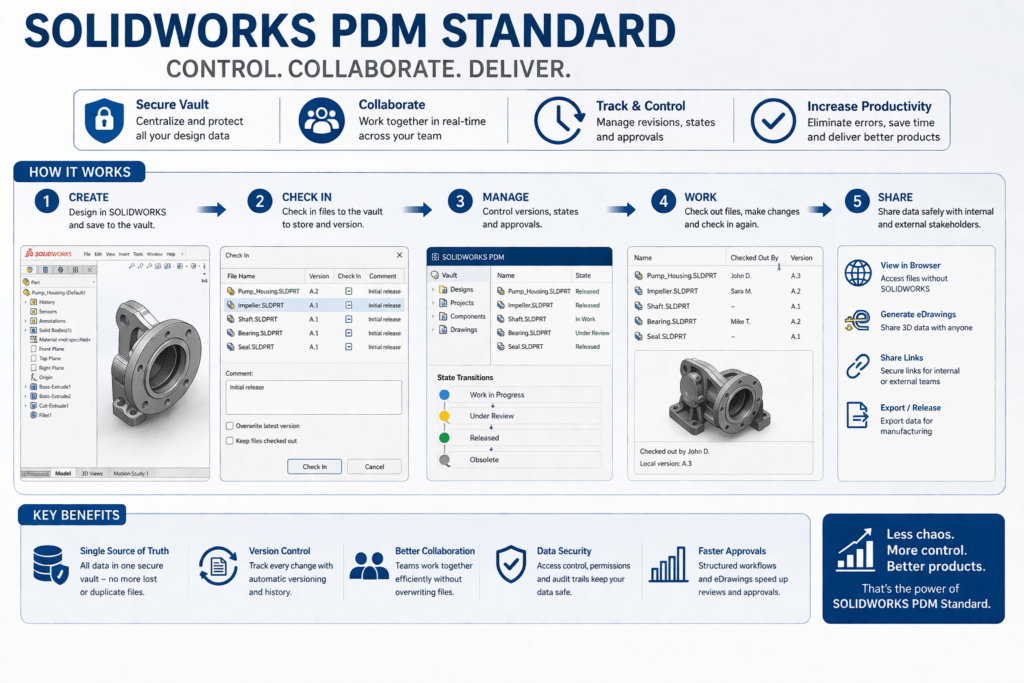
Product Data Management (PDM) Standard is probably the most popular reason for small and medium sized teams to proceed from Standard to Professional. In the absence of PDM, teams communicate via shared drives, email or Dropbox – and this causes version clashes, lost revisions, and many hours searching for “the latest file”.
PDM Standard sets up a controlled vault for files where:
- Saves are automatically versioned and dated
- Files are locked for editing (checked out) when in use – no more overwriting changes
- Record of changes, state changes (Draft → Released → Obsolete), and approvals in a database
- Filter by part number, revision, custom property, or components
PDM Standard can manage up to 5 vaults and has a capacity of 1-25 users. Most companies will graduate to PDM Professional (included with SOLIDWORKS Premium, or as an add-on).
Case study: A 7-person mechanical team brought down the time they took to “find the correct version of the assembly” from an average of 22 minutes per incident to less than 2 minutes by installing PDM Standard – by upgrading to SOLIDWORKS Professional on all seats.
2. SOLIDWORKS Visualize Standard – Renders Without a Render Farm

SOLIDWORKS Visualize Standard (formerly known as Bunkspeed) is a physically-based rendering tool that can import SOLIDWORKS files. With materials, appearance and scene lighting set up in Visualize, you can render photorealistic images of your product in minutes, not hours.
Key rendering capabilities:
- Physically accurate materials (metals, plastics, glass, rubber, etc.)
- Studio and environment lighting with HDR
- Output to PNG, JPEG, EXR, turndtables
- Real-time GPU acceleration (NVIDIA CUDA / OpenCL)
This means marketing and industrial designers can use the product model from engineering to generate product images for catalogues and websites, instead of a separate modelling pass in Cinema 4D, Blender or other product renderers.
3. TolAnalyst – Ferret Out Expensive Features Before the BOM is Sent to Manufacturing
TolAnalyst inspects all features in a solid model and estimates its cost to manufacture. It identifies features that are too expensive (deep blind holes, thin walls, tight tolerances, non-standard thread sizes) so the designer can choose the right trade-offs.
The aim, Dassault Systemes claims, is to take 80% of the cost data into the first 20% of the product lifecycle where design decisions are made. TolAnalyst delivers that visibility.
4. CircuitWorks – ECAD and MCAD Integrated
At companies where a printed circuit board (PCB) goes inside a mechanical box, the ECAD and MCAD design teams have traditionally shared data as static STEP files – an inefficient, error-prone cycle. CircuitWorks establishes a “real-time” two-way connection between SOLIDWORKS and ECAD packages such as Altium Designer, Cadence Allegro and Mentor PADS.
The connector positions on the PCB, keep-out areas, component heights and so on are automatically reflected in the SOLIDWORKS model. So, late in the day, no engineer finds a component is sticking out the top of the housing.
SOLIDWORKS Standard vs Professional vs Premium: Full Comparison

The three packages share the same core parametric modeller. What differs is the set of bundled tools. Use the table below to identify which tier meets your workflow:
| Feature | Standard | Professional | Premium |
| Parametric 3D solid modelling | Yes | Yes | Yes |
| Assembly modelling & mates | Yes | Yes | Yes |
| 2D drawings & detailing | Yes | Yes | Yes |
| Import/export (STEP, IGES, DXF, etc.) | Yes | Yes | Yes |
| Basic rendering (RealView Graphics) | Yes | Yes | Yes |
| eDrawings (standard) | Yes | Yes | Yes |
| PDM Standard (file management) | No | Yes | Yes |
| SOLIDWORKS Visualize Standard (rendering) | No | Yes | Yes |
| TolAnalyst / Cost Estimation | No | Yes | Yes |
| CircuitWorks (ECAD/MCAD) | No | Yes | Yes |
| eDrawings Professional | No | Yes | Yes |
| Toolbox & Design Library | No | Yes | Yes |
| Design Checker | No | Yes | Yes |
| Task Scheduler | No | Yes | Yes |
| SOLIDWORKS Simulation (FEA stress analysis) | No | No | Yes |
| SOLIDWORKS Motion (kinematic/dynamic) | No | No | Yes |
| Advanced Routing (electrical, piping, tubing) | No | No | Yes |
| SOLIDWORKS Sustainability (environmental impact) | No | No | Yes |
| Scan to 3D (mesh-to-solid) | No | No | Yes |
Guidance: If you care most about team files, renders, and price – go for Professional. If you need simulation or multiple branch routing – choose Premium. If you’re a single user and need to do simple 3D modelling – choose Standard.
Why Professional Is the Most Popular Mid-Market Choice
Reseller surveys and distributor reports from regions and country distributors show Professional to be the most popular SKU for engineering SMEs. There are two main reasons for this: it addresses the four most common issues faced by users after Standard:
- Wasted time finding the latest files (solved by PDM Standard)
- Customers wanting product images (solved by Visualize Standard)
- Procurement questions part costs (solved by TolAnalyst)
- Late-in-the-day PCB-enclosure interference (solved by CircuitWorks)
Premium’s simulation capabilities, while advanced, are used every day by a smaller group of engineers – FEA and motion simulations are often worked on by analysts, not designers.
SOLIDWORKS Professional Pricing & Licensing Options

SOLIDWORKS does not list prices on its website – resellers determine the price, which depends on the region, size of the purchase and maintenance package. The prices below are approximate, based on public reseller information (India and North America, April 2026):
| License Type | Description | Apprx. Price (USD) | Best For |
| Term License (Annual) | 12-month subscription; includes software updates and support during term; auto-expires unless renewed | Contact Tech Savvy | Teams who want predictable OPEX, no long-term commitment |
| Perpetual License | One-time purchase; perpetual right to use that version; optional annual maintenance contract (~18–22% of licence fee) for updates | Contact Tech Savvy | Teams who want long-term ownership and lower total cost over 5+ years |
| Network License (SNL) | Licence served from a central server; seats float across multiple users; minimum 5 seats typically required | Contact Tech Savvy | Large teams where not everyone needs concurrent access |
| SOLIDWORKS on 3DEXPERIENCE | Browser-accessible CAD via 3DEXPERIENCE platform; includes cloud storage and collaboration tools | Contact Contact Tech Savvy for bundle pricing | Fully remote or distributed teams; no local IT infrastructure preferred |
Term vs Perpetual: What’s Best for Your Team?
This is the most typical licensing decision. Here is a practical framework:
- Select Term if: you’re a startup or project-based organisation with a 3-year headcount unknown; you want to bundle support costs in an annual fee; or you need a new version annually.
- Choose Perpetual if: you plan to use the same version for 3-5+ years; your company treats software as a fixed asset; or your IT policy favours owning software vs subscriptions.
Over a 5 year timeframe, a perpetual license and maintenance is usually 15-25% less than a term subscription. But if cash is tight, it’s more common to choose term for the lower upfront cost.
Upgrading From Standard to Professional
You can upgrade from SOLIDWORKS Standard perpetual licenses to Professional via your reseller. The cost of the upgrade is normally 40-60% of the Professional licence, depending on the age of your maintenance subscription. Back-maintenance charges will apply if your maintenance has expired.
Frequently Asked Questions
SOLIDWORKS Professional includes: PDM Standard (data management), SOLIDWORKS Visualize Standard (rendering), TolAnalyst (costing), CircuitWorks (linking ECAD-MCAD data), eDrawings Professional, Toolbox (design library), Design Checker and Task Scheduler.
SOLIDWORKS Professional is “natively” a Windows desktop app. But Dassault Systemes does offer the option of a version that’s connected to the cloud via its 3DEXPERIENCE platform, enabling browser and cloud storage. The two versions are different SKUs; for performance reasons, engineering teams still generally use the desktop version.
A stand-alone (node-locked) license is single computer specific. If you require more flexibility and only want to be tied to one machine, then a network (floating) license – licensed from a central server (License Manager) – means the seat can be used by any computer on the network, but that only one user can be using the seat at a time.
Premium includes all of Professional’s capabilities plus: SOLIDWORKS Simulation (finite element analysis, linear and nonlinear), SOLIDWORKS Motion (kinematic and dynamic assemblies), advanced electrical and piping routing, SOLIDWORKS Sustainability (environmental impact analysis) and Scan to 3D (point-cloud to solid conversion). SOLIDWORKS Professional is a better value if your team does not do structural stress simulations or complicated piping and electrical routing.
Yes. Dassault Systemes provides a 30-day trial of SOLIDWORKS Professional through resellers. Resellers like us can issue a trial in India. You can contact your reseller directly (no SOLIDWORKS website trials).
SOLIDWORKS Professional has the same system requirements as any other SOLIDWORKS product: Windows 10 or 11 (64-bit); Intel Core i7 or Xeon equivalent (multi-core); 16 GB RAM minimum (32 GB recommended for complex assemblies); NVIDIA Quadro or AMD Radeon Pro certified GPU for RealView and rendering acceleration; SSD storage strongly recommended. Be sure to check out the SOLIDWORKS Certified Hardware list at solidworks.com when buying a computer.
Annual term licenses are renewed by your reseller. Quotes are generally sent out 60-90 days prior to renewal. If you do not renew on time, the software will not work until you do so – whereas perpetual versions do work with the software you have licensed. Place a reminder in your calendar far in advance.
Bottom Line: Is SOLIDWORKS Professional Worth It?
If you have two or more engineers on a product development project that involves anything from client reports, to a design-to-manufacturing handoff, SOLIDWORKS Professional is not a nice-to-have, it’s a must.
The “free” PDM Standard license (which would cost several thousand dollars a year as a stand-alone PDM solution) alone makes the upgrade from Standard worthwhile for most teams. Add ecodesign, costing, ECAD/MCAD collaboration and photorealistic rendering, and the return on your investment is clear.
The only teams who should not step-up to Professional are:
- Individuals who don’t collaborate on files
- Teams with their main problem is simulation (go straight to Premium)
- Students or educational users (SOLIDWORKS Student Edition provides all the Standard features, at a discounted price)
For everyone else, particularly product development SMEs in the automotive, consumer electronics, industrial equipment and medical devices markets, this is where engineering productivity takes a big step forward in SOLIDWORKS Professional.
Ready to move up from Standard?
Ready to unlock the full potential of your CAD workflow?
Talk to TechSavvy – your trusted SOLIDWORKS partner for:
- Free trial access
- Best pricing options
- Hardware + software consultation

Make the switch to SOLIDWORKS Professional with confidence.