
Building a Physical Product? Professional CAD Is No Longer the Barrier
Building a tangible product. You’re well aware about the commercial licenses price of SOLIDWORKS professional grade CAD. That’s a definite obstacle for a startup hardware company that isn’t selling hardware at this point.
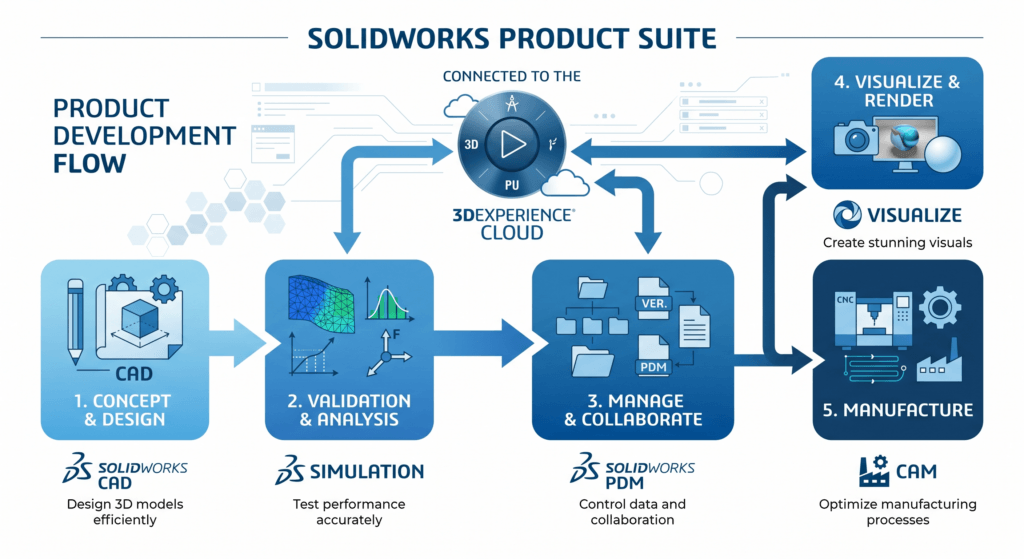
What most founders don’t realize is that SOLIDWORKS has everything they need CAD, simulation, PDM, visualization, and everything in between for free in its full professional suite during Year 1 of the Startups Program. Year 2 is 70% off. Year 3 is 50% off. The licenses are 100% commercial, meaning that your IP belongs to you.
SOLIDWORKS for Startups Program provides access to SOLIDWORKS Suite (CAD, Simulation, PDM and 3DEXPERIENCE Cloud) for 12 months for qualifying early-stage hardware startups (less than 5 years old, less revenue, creating a physical product to sell) with no-cost for the first year and significant discounts during years 2 and 3.
This guide is for all of these: what’s in it, who can use it, real cost comparisons, and how it compares to Fusion 360 and Onshape and a step-by-step walkthrough of how to use it. If you’re a hardware founder, this is the most important software decision you’ll make.
What Is the SOLIDWORKS for Startups Program?
The Startups Program, created by Dassault Systèmes SOLIDWORKS parent company is designed for early- to mid-stage hardware start-ups. The argument is simple: SOLIDWORKS was itself a scruffy 1995 start-up, it beat the more expensive competitors, and it was built to run on consumer Windows machines. It has a real interest in hardware innovation working.
The program removes the largest hurdle standing in the way of founders the cost of software at a time when you’re most in need of it and least able to afford it, and most in need of design tools.
What’s Included in the Startup Package?
| Tool | What It Does | Startup Value |
|---|---|---|
| SOLIDWORKS CAD | Parametric 3D modeling, assemblies, engineering drawings | Core product design from concept → DFM-ready files |
| Simulation (FEA/CFD) | Finite element analysis, fluid dynamics, thermal | Catch failures before expensive physical prototypes |
| PDM (Product Data Mgmt) | Version control, file management, revision history | Team of 3+ won’t overwrite each other’s work |
| Visualize | Photorealistic renders, animations | Investor decks, crowdfunding campaigns, marketing |
| Composer | Technical illustrations, assembly instructions | Manufacturing documentation, user manuals |
| CAM | CNC toolpaths from SOLIDWORKS geometry | Direct path to machined prototypes or production |
| 3DEXPERIENCE Cloud | Cloud-based collaboration platform | Remote team access, supplier sharing, cloud storage |
| Technical Support | Expert engineers, onboarding, mentoring | Faster ramp-up, fewer roadblocks |
Startup program licenses do not restrict commercial use, as do educational licenses. All products, IP and deliverables are yours to sell.
SOLIDWORKS vs Fusion 360 vs Onshape: Which CAD Should Startups Choose?
This is a question every hardware founder has to ask, and it should be answered a truthful one, one that isn’t vendor-biased. The complete comparison along the real size dimensions that DO make a difference during the early stage:
| Factor | SOLIDWORKS (Startup Program) | Fusion 360 | Onshape | FreeCAD |
|---|---|---|---|---|
| Year 1 Cost | (free) | High cost | High cost | Free |
| Commercial use | ✓ Full | ⚠ Restricted on free tier | ✓ Full | ✓ Full |
| Simulation (FEA) | ✓ Included | ⚠ Paid add-on | ⚠ Paid add-on | ✗ Limited |
| Industry standard | ✓ Manufacturing default | ⚠ Growing | ⚠ Emerging | ✗ Niche |
| Large assemblies | ✓ Best-in-class | ⚠ Struggles 500+ parts | ⚠ Moderate | ✗ Poor |
| Learning curve | ⚠ Moderate-steep | ✓ Gentler | ✓ Gentle | ⚠ Steep |
| Cloud collaboration | ✓ 3DEXPERIENCE | ✓ Native cloud | ✓ Native cloud | ✗ Manual |
| Contract mfg. acceptance | ✓ Universal | ⚠ Most accept | ⚠ Growing | ✗ Rare |
| Investor credibility signal | ✓ Strong | ⚠ Neutral | ⚠ Neutral | ✗ Negative |
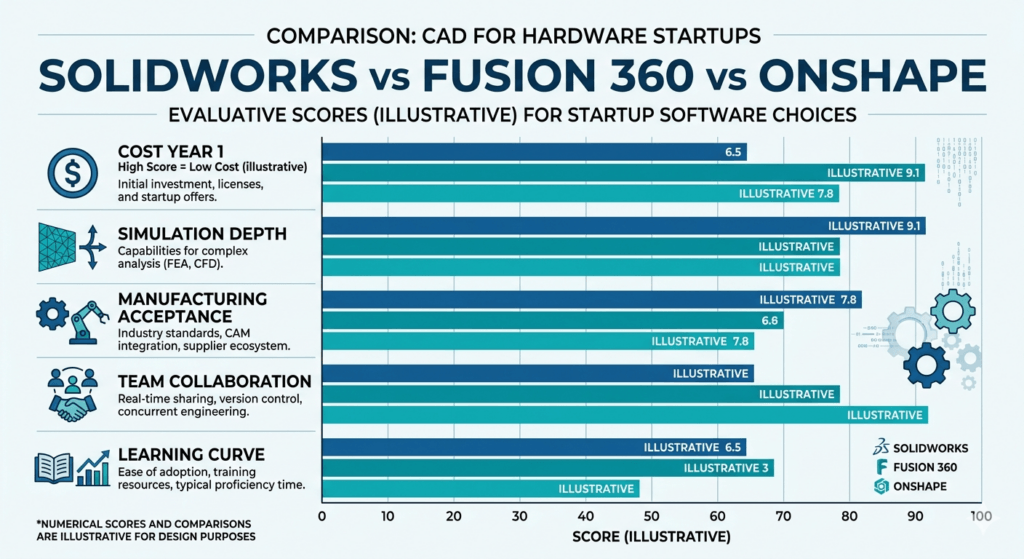
In conclusion, SOLIDWORKS is the winner when creating complex mechanical products and is more scalable, more accepted for manufacturing, and more extensive in simulation capabilities, particularly when it comes to low or zero cost for Year 1. Fusion 360 is a viable option for consumer-electronics or less complex form-factor products, where the smoother learning curve allows for faster iterations.
SOLIDWORKS Startup Program Eligibility Requirements
To get certified as a SOLIDWORKS Startup Program, you must meet the following criteria:
Qualification is simple: but the edge cases are significant. Well, here’s the rest of the story:
- ✅ If you are not a SOLIDWORKS customer, then you are eligible. Current SOLIDWORKS subscribers or licensees are not eligible.
- ✅ Yes, if the business was established less than 5 years ago (since its Incorporation Date).
- ✅ Hardware, devices, equipment, consumer products it’s a physical product that is built and not just pure software.
- ✅ Target to sell that product commercially – personal projects and/or internal tooling will not be considered.
- ✅ Pre-revenue startups can be 100% eligible if their annual revenue is less than 1 million.
- ❌ The following restrictions apply: service providers, engineering/design firms, consultants, contract manufacturers are not open to.
Edge Cases Founders Commonly Ask About
Pre-seed / Pre-revenue
Yes, fully eligible. Many startups accepted are definitely low income businesses at the time of application.
Solo Founder
Yes. The program doesn’t require a minimum team size. Producers and people with a hardware concept who are solo founders often get approved.
Already Using Fusion 360?
It’s difficult to change CAD packages mid-project. If you’re in the early concept stages, submit your application now, as the complexity of your model increases, so does the difficulty of submitting translation.
SOLIDWORKS Startup Pricing: Years 1–3
One of the most common questions which no competitor page clearly answers it’s: The Tech savvy has made complete cost breakdown in one article.
Estimated costs based on published reseller pricing and program terms. Discount may apply to these prices and varies from region to region and reseller to reseller. Please check with your local authorized reseller for exact pricing.
The 3-year cost advantage of SOLIDWORKS Startup Program: You save an estimated more money over three years with SOLIDWORKS Startup Program, and you have industry standard tools from day one.
How Simulation Saves Startups Real Money
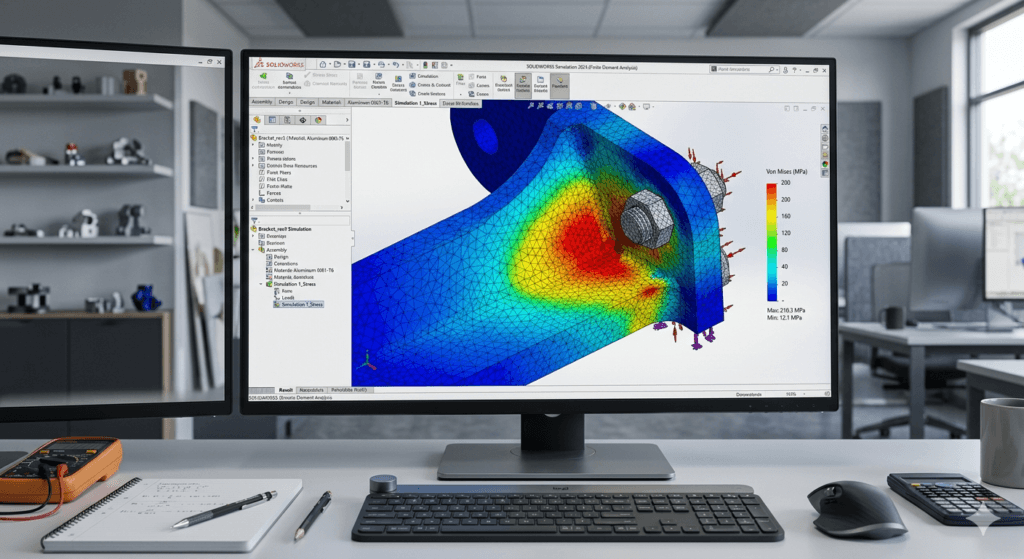
Most people who start up concentrate on CAD. The secret is in simulation. Physical prototyping is costly. You can search for structural failure, stress concentrations, and thermal issues virtually, without ordering a single machined part, using SOLIDWORKS Simulation (FEA). For many product categories, the cost of the whole 3-year program can be saved with capturing just one iteration.
From Napkin Sketch to Manufacturing
In this blog, we’ll take a look at how successful hardware companies leverage SOLIDWORKS throughout their development lifecycle:
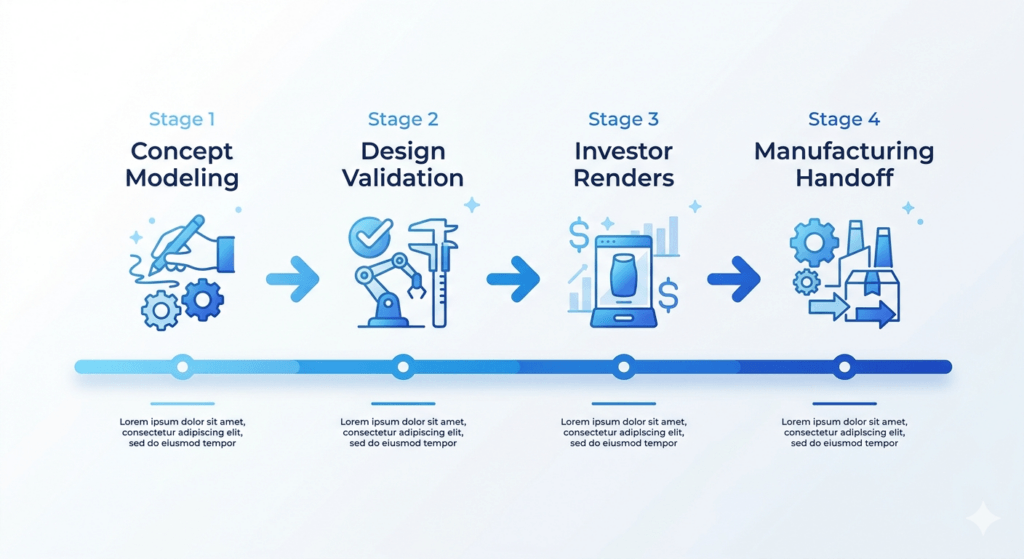
Stage 1 Concept Development (Pre-Prototype)
Leverage SOLIDWORKS’ easy-to-use 3D sketch tools to quickly convert physical concepts into parametric models. The parametric approach is the ability to change one dimension and the rest follow accordingly throughout your complete design, which is especially important if you are still exploring your product’s shape.
Stage 2 Design Validation (Pre-Prototype)
Do FEA stress tests on load bearing components, check thermal profiles on electronics enclosures, and validate motion of mechanisms using SOLIDWORKS Motion before investing in physical prototypes. It takes hours to find a fatal flaw in simulation. It will take months and prototypes to find in a 15,000 prototype.
Stage 3 Investor Presentation (Series A)
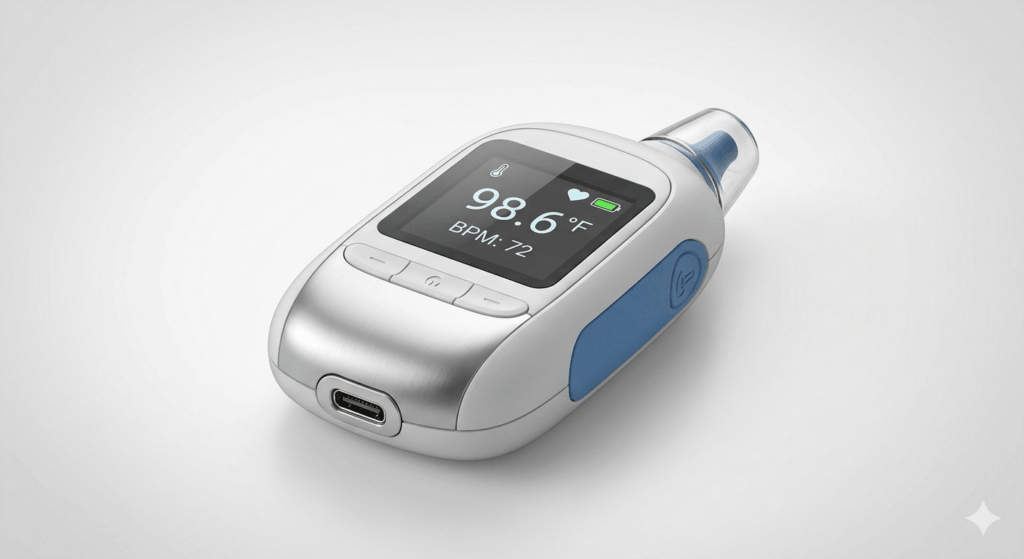
SOLIDWORKS Visualize creates photorealistic images and animation from CAD geometries. Investors are looking at a shiny, printable product and not a crappy 3D print. Founders say that they can get quality renderings that could be equivalent to10,000 product photos for near zero cost.
Stage 4 Manufacturing Handoff (DFM)
SOLIDWORKS natively creates GD&T drawings, BOMs and manufacturing ready file formats (STEP, IGES and DXF). SOLIDWORKS connectivity to contract manufacturers throughout Asia and North America eliminates friction and misinterpretation problems at handoff.
Step-by-Step Application Process
Most founders are surprised at how quickly the application process goes, with approval usually coming within 24 hours.
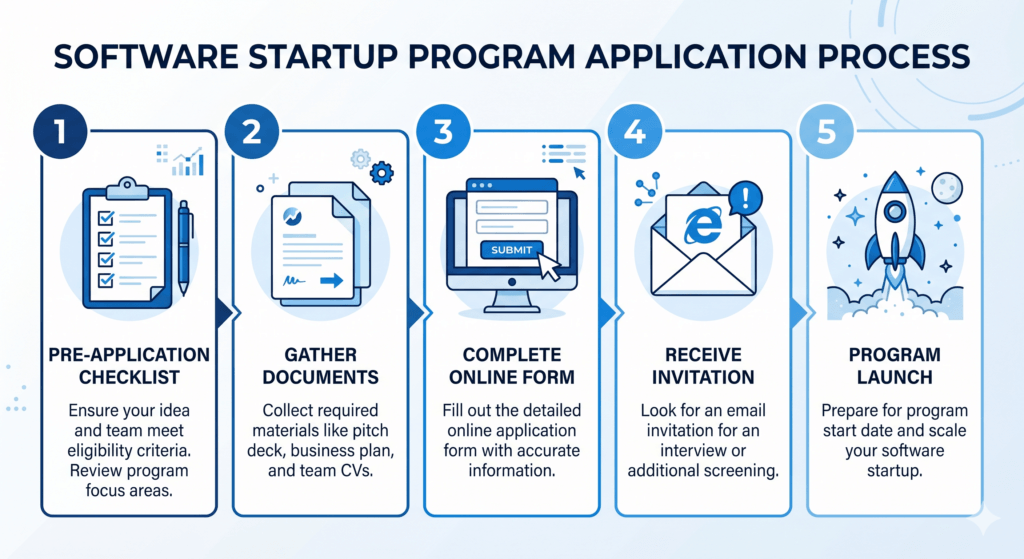
Step 1 Confirm Eligibility
New SOLIDWORKS customer, less than five years in business, physical product, under 1M USD. Check all four. In the event of doubt, do apply the team discuss edge-cases on a per-case basis.
Step 2 Gather Basic Information
Name of company, date founded, Product description, Funding stage. No long, detailed business plan needed.
Step 3 Choose Your Application Route
Purchase direct from solidworks.com or from an authorized reseller (Hawk Ridge Systems, TriMech, etc.). There is often extra onboarding assistance available for resellers.
Step 4 Submit and Wait
Upon sending, an e-mail is sent confirming the appointment. Most decisions are completed within a few business days, which is generally less.
Step 5 Onboard Quickly
The Desktop SOLIDWORKS installs in less than an hour using a wizard. The activation of 3DEXPERIENCE (cloud) version takes minutes. Your reseller provides onboarding sessions with experts to get your team up and running with your solution.
Tips: Apply early in the product development. The earlier you can be in the ecosystem the more simulation and iteration cycles you will run before the Series A due diligence and the more compelling your technical story will be.
Is SOLIDWORKS the Right Choice for Your Startup?
SOLIDWORKS Is Best If:
- Your product is comprised of precision fit components, mechanical assemblies or structural parts
- You plan to work with contract manufacturers, especially in Asia (SOLIDWORKS is the default expectation)
- Your team has some engineers who have prior experience in SOLIDWORKS (fastest to productive)
- You require simulation FEA, CFD and motion in your validation process
- You need to demonstrate to investors the professional level of tooling you are building
Fusion 360 Might Be Better If:
- You are developing a more basic product form and your staff does not have any CAD experience
- Your product is basically an electronic product with not much mechanical complexity
- You want to rapidly make iterations to consumer products, and CAM integration is the primary concern
- Mac compatibility is required (SOLIDWORKS is Windows only on desktop)
Frequently Asked Questions
Are startups totally free of SOLIDWORKS?
All tools for CAD, Simulation, PDM, Visualize, and 3DEXPERIENCE cloud are included in Year 1, and are free of charge. No hidden fees, no limits on usage, and 100% commercial license. The Year 2 and 3 are about 70% and 50% off the commercial rates. Standard commercial pricing is applicable after Year 3.
May I use the startup license on commercial products that I sell?
Yes. This is one thing that sets it apart from educational licenses. The SOLIDWORKS Startups Program provides full commercial-use rights. All products you design, all IP you create, all deliverables you generate are yours for commercial sale or manufacture.
If my startup makes more than 1M in revenue during the program, what do I do?
Current licenses continue to be valid until the end of your program term. You will switch to commercial rates at renewal time. This provides you with a runway for a transition you will need to plan for, without any sudden disruption of your development work.
Which is more suitable for hardware startups, SOLIDWORKS or Fusion 360?
But for advanced simulation requirements, manufacturing bound workflows and complex mechanical products, SOLIDWORKS is a distinct advantage, particularly at Rs 0 for the price of the Startups Program. Fusion 360 is easy to use for simpler products and for teams without CAD experience, and it’s accessible and affordable. The cost argument for Fusion 360 becomes not so strong if you qualify to the SOLIDWORKS program.
Can a Pre-revenue, Pre-seed startup apply?
Yes. The only requirement is that you’re under 1 million zero will do. There are many startups that are accepted at the initial concept stage. What is important is that you’re creating a product that you’ll be selling commercially and that you’re not in business for more than 5 years.
What SOLIDWORKS do I select: Desktop SOLIDWORKS or 3DEXPERIENCE SOLIDWORKS?
Both are incorporated into the program. For teams that requires robust, feature-rich environments and rely on a stable hardware environment, Desktop SOLIDWORKS is a mature, feature-rich environment that can be installed locally. 3DEXPERIENCE SOLIDWORKS is cloud-based for collaborative and accessible real-time experience, anywhere. If you are a remote first team or a founder that needs to collaborate with suppliers often, 3DEXPERIENCE is likely the default in 2025.
Ready to Apply? Here’s Your Next Step
One of the great opportunities for hardware startups which is underused is the SOLIDWORKS for Startups Program. Professional-grade simulation, PDM, visualization, and CAD free for a year, deeply discounted for two more commercial rights to all you create.
Please submit your request directly to solidworks.com or contact an authorized reseller to get on-boarding assistance. It takes days, not weeks, to go through the review process. Your competitors could be already using SOLIDWORKS to get to market quicker.
🚀 Ready to Experience 3DEXPERIENCE in Action?
See how cloud-powered SOLIDWORKS can transform your design workflow, improve collaboration, and eliminate version chaos — all in one connected platform.
- ✔ Personalized demo based on your workflow
- ✔ Expert guidance on SOLIDWORKS + 3DEXPERIENCE setup
- ✔ Clear pricing & ROI insights for your team
No commitment. Get clarity before you invest.