
CAD software has been the precision, patience and tedious manual repetition affair for decades. That’s quickly changing.
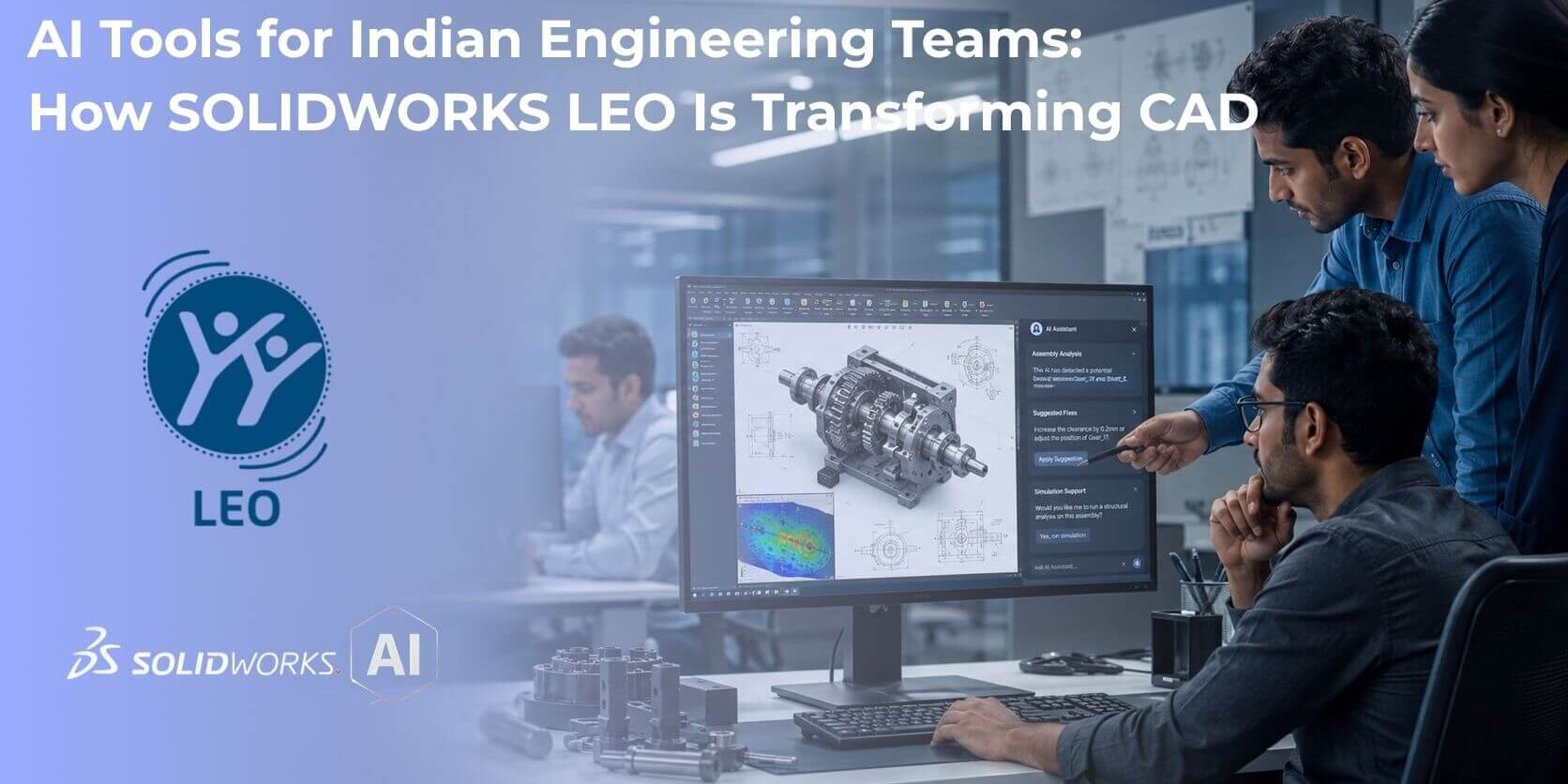
Dassault Systèmes has started rolling out LEO, an AI engineering companion designed specifically for SOLIDWORKS, and it is changing the way design, simulation and validation is done.
This change is particularly important for Indian engineering teams, especially those scaling rapidly across automotive, industrial equipment and contract manufacturing.
In this guide, we will explain what exactly LEO is, the role of LEO within the SOLIDWORKS 2026 roadmap, and why it is relevant in particular for engineering teams in India.
So What Is LEO in SOLIDWORKS?
LEO is a purpose-built AI engineering companion from Dassault Systèmes, designed to work inside SOLIDWORKS to help solve technical challenges across engineering disciplines.
LEO is not simply an automation script. It is designed as an interactive, conversational collaboration tool accessed through its connection with the 3DEXPERIENCE platform.
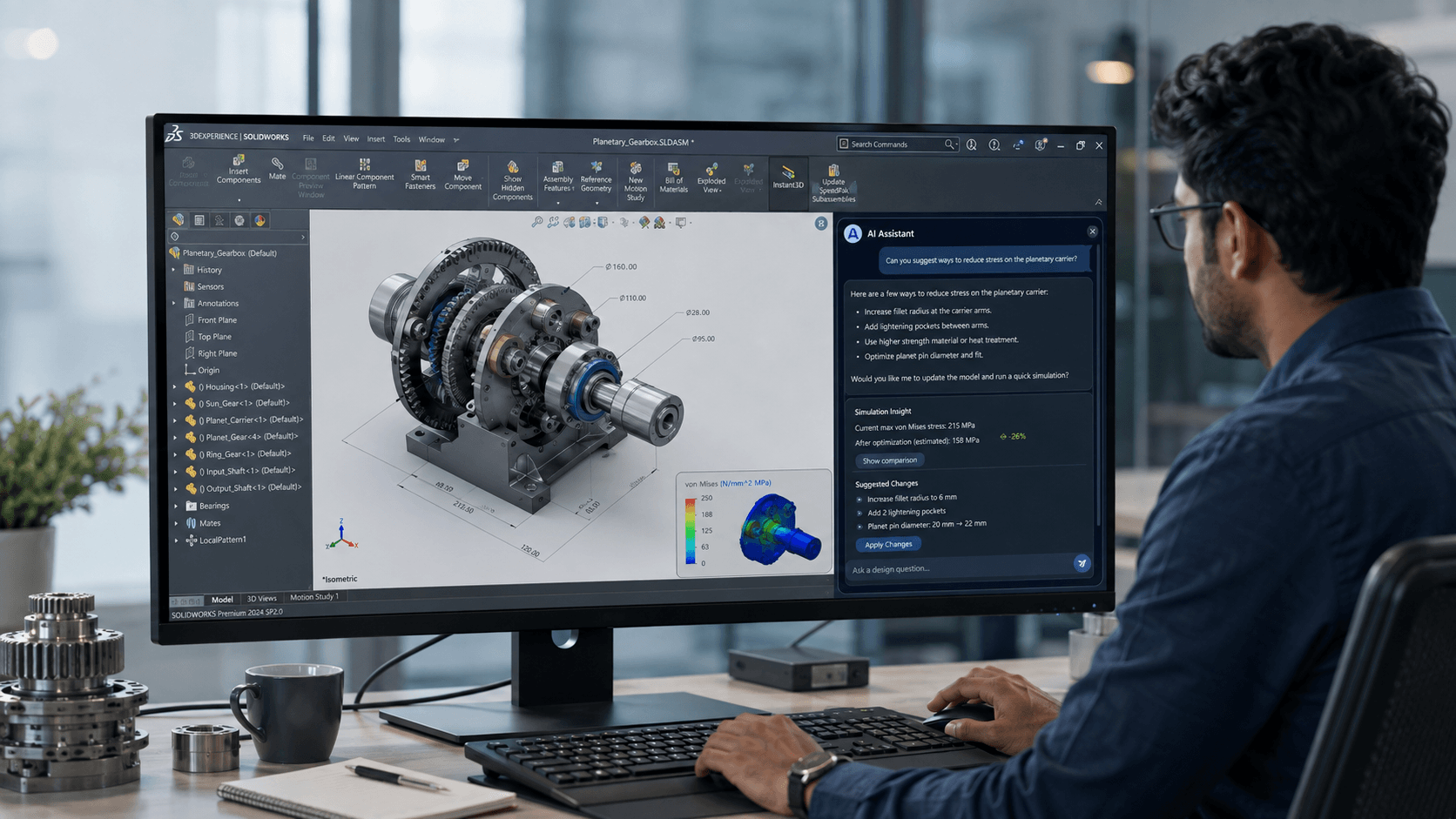
Using natural-language prompts, LEO can create assembly structures, process reference images into mesh geometry, add parametric features to STEP files, perform simulation studies, analyze assemblies, and detect design errors.
Unlike general-purpose AI tools, LEO focuses specifically on mechanical design and validation. The objective is to help engineers spend less time on repetitive groundwork and more time on engineering decisions.
LEO was introduced alongside another tool, AURA, as part of the SOLIDWORKS 2026 AI initiative. In SOLIDWORKS 2026x FD03, Virtual Companions have been upgraded to cloud-based versions capable of interpreting natural-language requests within the familiar SOLIDWORKS desktop environment.
Key LEO Capabilities Engineering Teams Are Already Using
Several LEO capabilities have moved beyond demonstrations and into practical engineering workflows.
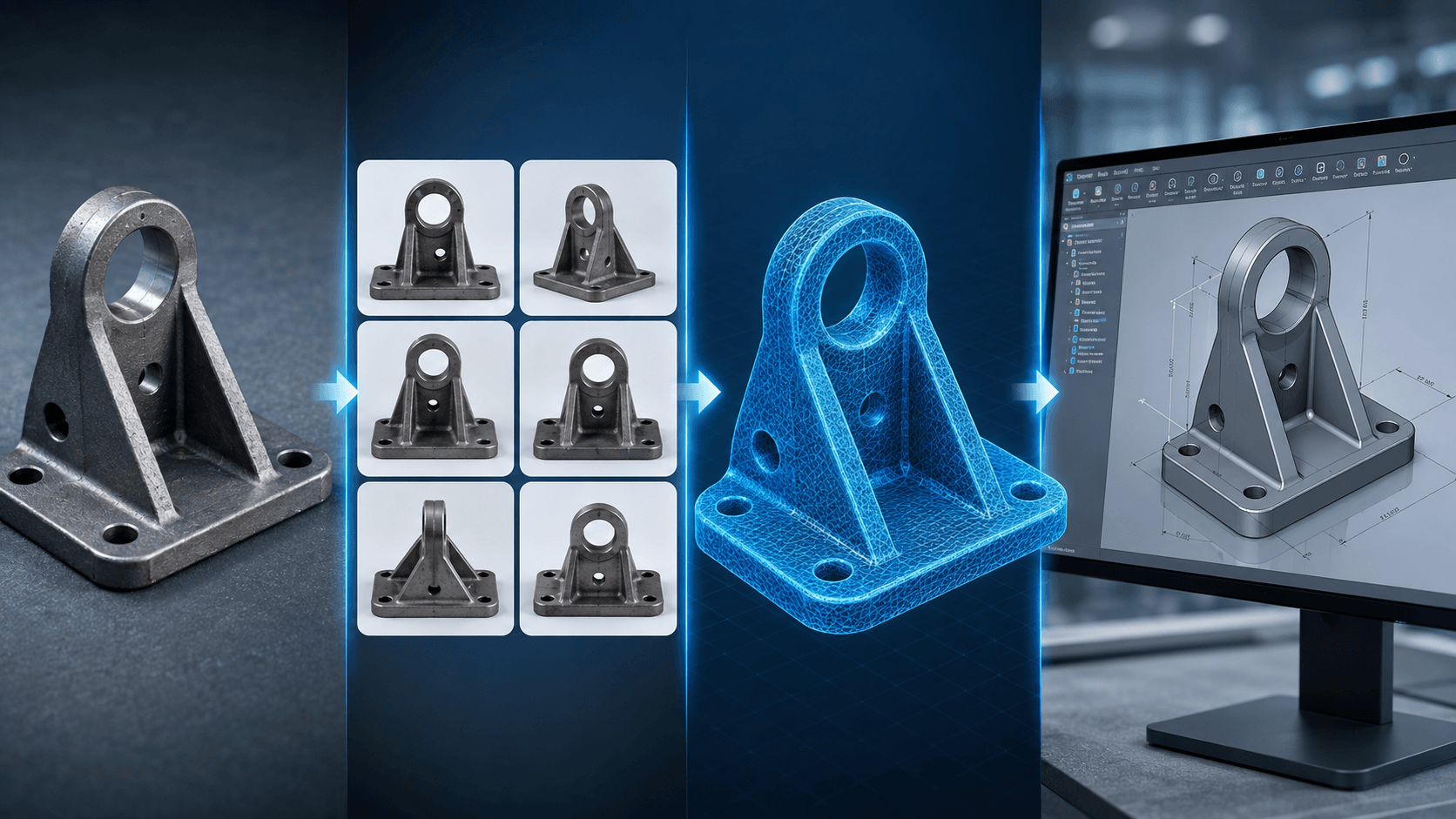
1. Image-to-Mesh Modeling
Instead of creating every design from scratch, engineers can upload an image of an existing physical object and use LEO to generate a 3D mesh.
This can be particularly useful when working with legacy parts, damaged components, or physical products that do not have corresponding CAD data.
2. Requirement-to-Model Generation
In one demonstrated workflow, an engineer provided LEO with requirements for a steel structure. LEO was able to model, simulate and validate the design within a single session.
The potential benefit is significant: workflows that traditionally take several days can potentially be compressed into a much shorter design cycle.
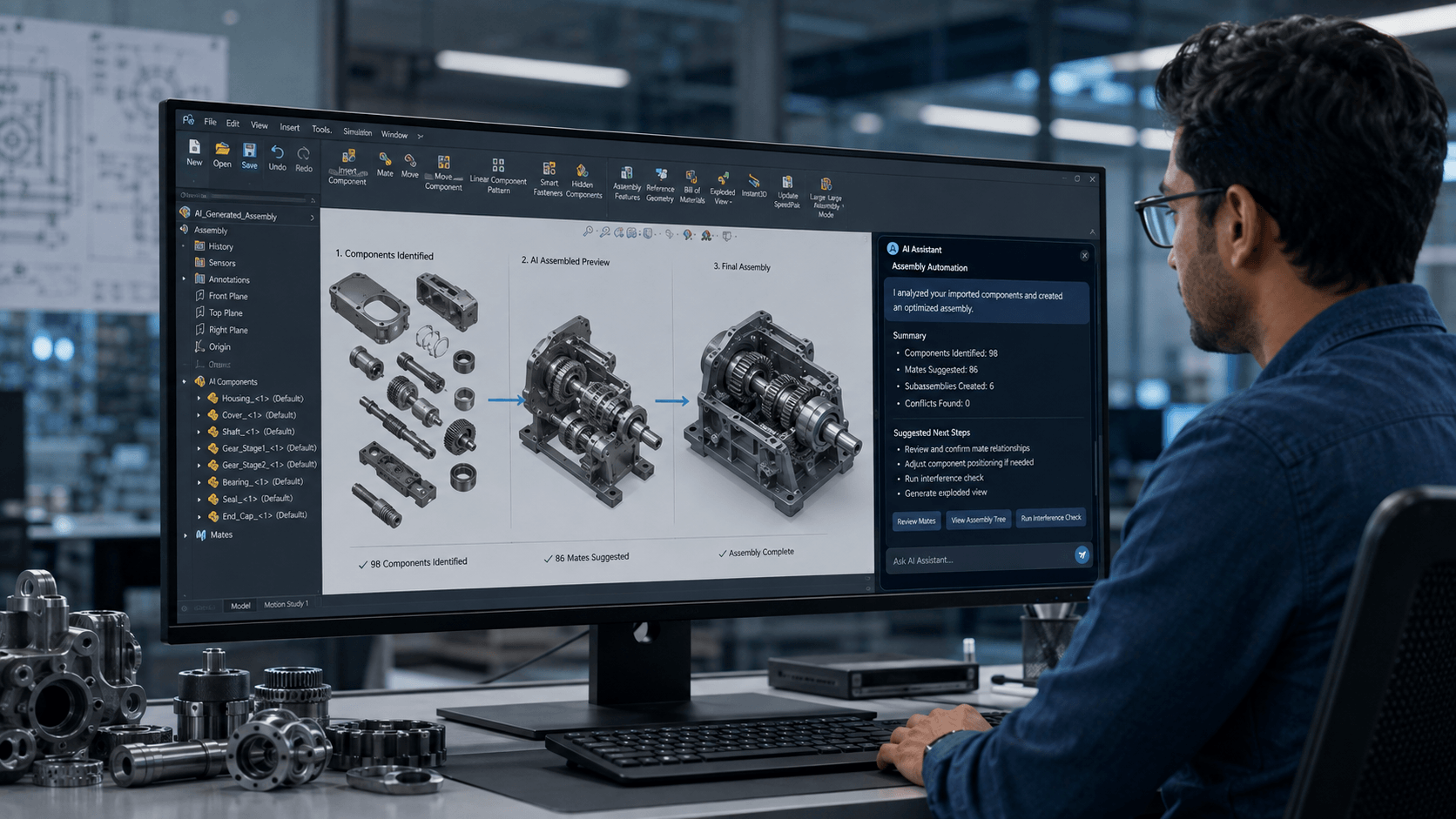
3. Assembly Structure Automation
LEO can help reverse-engineer 2D drawings into parametric models, automate simulation runs and create complex assembly structures.
Some of these capabilities, including assembly structure creation, are already available through SOLIDWORKS releases and the SOLIDWORKS Labs environment.
4. STEP File Enrichment
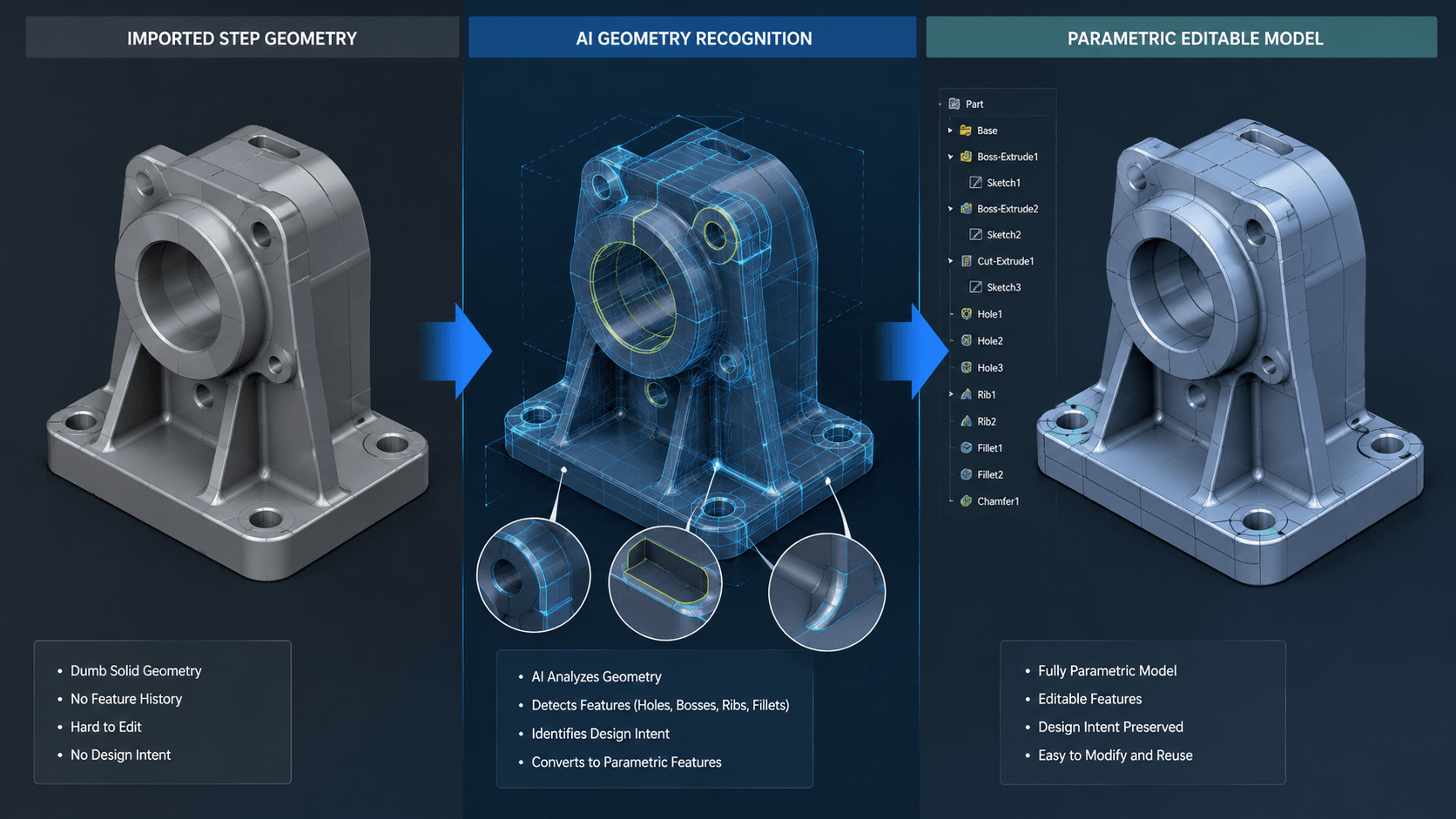
One of the most useful capabilities is the ability to work with imported or “dumb” geometry and turn it into more editable, parametric geometry.
For engineering teams that regularly receive STEP files from customers or suppliers, this can reduce the time normally spent manually rebuilding feature history.
5. Design Error Detection and Fixes
AI-based diagnostics can identify potential model problems and provide suggestions for resolving them before they create downstream manufacturing issues.
This creates another opportunity for engineers to use AI as an early validation partner rather than waiting until problems appear later in the product development process.
Why Does This Matter for Indian Engineering Teams?
From automotive OEMs in Pune and Chennai to industrial design studios in Bengaluru and contract manufacturers across the NCR, India’s engineering and manufacturing sector has traditionally competed through a combination of skilled talent and cost efficiency.
AI-enabled CAD tools such as LEO could change that equation in several important ways.
Faster Iteration Cycles
Concept-to-validation cycles that previously took days could potentially be reduced to hours for suitable workflows.
For Indian engineering services companies competing for global outsourced design contracts, faster iteration can become a meaningful competitive advantage.
Reduced Reliance on Senior Engineering Bandwidth
Junior engineers can use LEO for first-pass assemblies, conversions and error checks while senior engineers focus their time on higher-value review and engineering decisions.
This does not eliminate the need for experienced engineers. Instead, it can help senior engineers spend less time on repetitive modeling work.
Better Use of Legacy Information
Many manufacturing environments still rely on physical components, scanned drawings or legacy documentation without native CAD files.
Capabilities such as image-to-mesh and drawing-to-model conversion could help bridge that gap.
Cloud-First Scalability
Because LEO operates through the 3DEXPERIENCE platform, distributed teams—including remote and hybrid engineering teams common in Indian engineering research and development services—can collaborate around AI-assisted workflows without relying entirely on heavy local infrastructure.
If your team already has strong SOLIDWORKS assembly modeling skills or is exploring simulation-driven design, LEO should be viewed as an extension of that foundation rather than a replacement for it.
What Do You Need to Access LEO?
Not every SOLIDWORKS license automatically provides access to LEO.
The document identifies the following requirements:
- SOLIDWORKS Design 2026 SP3.2 or newer
- An eligible SOLIDWORKS Design named-user license or SOLIDWORKS Design with Cloud Services
- Cloud Services activated
- A required platform connector installed
- An authenticated 3DEXPERIENCE platform session within SOLIDWORKS Design
One important point is that using a cloud-enabled AI companion does not necessarily mean that every SOLIDWORKS file has to be moved to the cloud.
Many LEO and AURA capabilities can work with documents opened from local storage. This distinction can be important for Indian engineering organizations dealing with sensitive OEM or defence-related intellectual property and data-residency requirements.
Practical Considerations Before Rolling Out LEO
Before introducing LEO across an engineering organization, there are several practical considerations worth evaluating.
1. Licensing Cost
Cloud Services and platform connectivity can add to the existing SOLIDWORKS subscription cost. A pilot group can be a practical way to evaluate the return before a wider deployment.
2. Internet Reliability
Because LEO’s conversational capabilities are connected to the 3DEXPERIENCE platform, reliable internet connectivity becomes more important than it is with a traditional desktop-only SOLIDWORKS workflow.
3. Data Governance
IT and compliance teams should determine which projects and file types are appropriate for cloud-connected AI workflows, particularly when customer intellectual property or other sensitive engineering information is involved.
4. Training and Adoption
Prompt-based CAD interaction is different from traditional menu-driven modeling. Even experienced designers may benefit from a short introduction to effective AI-assisted workflows.
How Should Engineering Teams in India Get Started?
A phased implementation is likely to be the most practical approach.
- Select one active engineering project.
- Choose a small pilot group.
- Use SOLIDWORKS 2026 SP3.2 or newer where applicable.
- Identify a measurable task such as assembly setup, error correction or legacy drawing conversion.
- Measure the time saved and quality of the resulting work.
- Involve IT and compliance teams early when sensitive client data is involved.
- Use the results to decide whether a broader rollout makes sense.
This approach makes it easier to evaluate the technology based on actual engineering outcomes rather than simply adopting AI because it is new.
LEO SOLIDWORKS Workflows vs. Traditional SOLIDWORKS Workflows
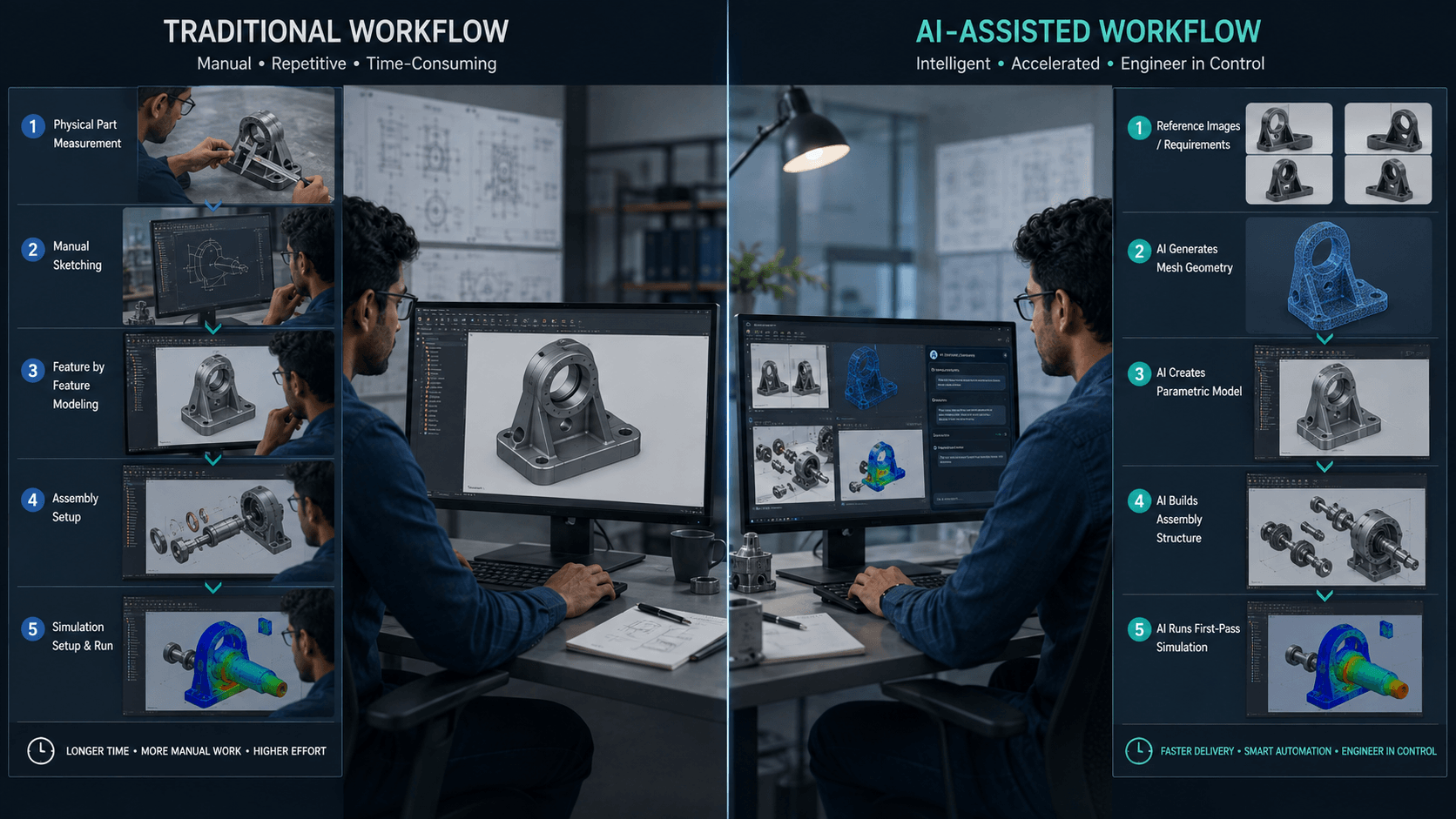
Consider the process of working with a legacy component.
In a conventional workflow, an engineer may need to measure the physical component, sketch reference geometry, build the model feature by feature and then create a separate simulation setup. For a moderately complex bracket or housing, this can represent a substantial amount of work.
With LEO, the workflow can potentially begin with reference photographs or a scanned 2D drawing. Initial mesh geometry, parametric features and a first-pass simulation can then be generated much faster.
However, this does not remove engineering judgment from the process.
LEO’s output should be treated as a strong starting point, not a final signed-off design.
Tolerances, material specifications, manufacturability and other engineering decisions still require human review.
In that sense, LEO is less about replacing the designer and more about replacing the blank-canvas stage of the workflow where engineers often spend significant time on repetitive groundwork.
How Does LEO Fit into India’s Engineering Services Landscape?
India’s engineering research and development sector has become one of the world’s major outsourced design hubs, serving automotive, aerospace and industrial equipment companies that expect both speed and cost efficiency.
AI-assisted CAD tools such as LEO could accelerate two important trends.
Higher-Value Engineering Work Moving to India
As routine modeling and first-pass assembly work becomes increasingly automated, global customers may increasingly look to Indian engineering teams for more complex validation, simulation review and design-for-manufacturing activities.
Smaller Teams Handling Larger Scopes
Teams may be able to handle larger engineering scopes by using AI for first-pass modeling and error checking while experienced engineers concentrate on review, validation and final sign-off.
For engineering services companies, demonstrating AI-assisted delivery capability could increasingly become a differentiator when competing for global contracts.
Frequently Asked Questions About SOLIDWORKS LEO
Do you get LEO with a standard SOLIDWORKS license?
No. LEO requires SOLIDWORKS Design 2026 SP3.2 or later, an eligible named-user license or SOLIDWORKS Design with Cloud Services, and an active authenticated connection to the 3DEXPERIENCE platform.
Does using LEO mean all SOLIDWORKS files have to be uploaded to the cloud?
Not necessarily. Many LEO capabilities can work with documents opened from local storage, so adopting LEO does not automatically require an organization to migrate its entire file vault to the cloud.
Is LEO just a generic AI chatbot added to CAD?
No. LEO is designed to work with mechanical design information such as assemblies, features and simulation workflows rather than simply functioning as a general-purpose chatbot layered onto CAD software.
Will LEO replace design engineers?
Not likely in the near term. Current capabilities focus on accelerating repetitive modeling, conversion and validation tasks. Engineering judgment, tolerancing decisions and manufacturability sign-off still require human expertise.
How should an Indian engineering team start evaluating LEO?
Start with a pilot project. Select one active project, identify a measurable task such as assembly setup or legacy drawing conversion, and compare the time and quality of the AI-assisted workflow with the existing process.
Final Thoughts
LEO represents a broader shift in CAD: software is moving from being purely a manual precision tool toward becoming a conversational engineering partner.
For Indian engineering teams competing globally on both speed and cost, early adoption of AI-assisted CAD capabilities could become a meaningful competitive advantage.
The key, however, is to adopt the technology carefully and with appropriate data governance.
The engineering teams most likely to benefit are those that treat LEO as a research, modeling and validation partner—not as a replacement for engineering judgment.
Looking to learn more about implementing SOLIDWORKS AI tools in your engineering workflow? Get in touch with our SOLIDWORKS experts for a tailored assessment.